Effortless sound
at your fingertips.

Effortless sound
at your fingertips.

Effortless sound
at your fingertips.

Control your existing smart sound system with intuitive ease. Tewke connects seamlessly with your existing smart sound setup, bringing physical controls back to the wall. Tap transforms your light switch into a on-wall controller, allowing you to play, pause, skip, browse playlists and balance room volume without touching a phone.

Control your existing smart sound system with intuitive ease. Tewke connects seamlessly with your existing smart sound setup, bringing physical controls back to the wall. Tap transforms your light switch into a on-wall controller, allowing you to play, pause, skip, browse playlists and balance room volume without touching a phone.

  • Playback control

    Music control, right on your wall.

    Play, pause, skip tracks and see what is currently playing directly from the Tap on your wall, without reaching for your phone.

  • Queue selection

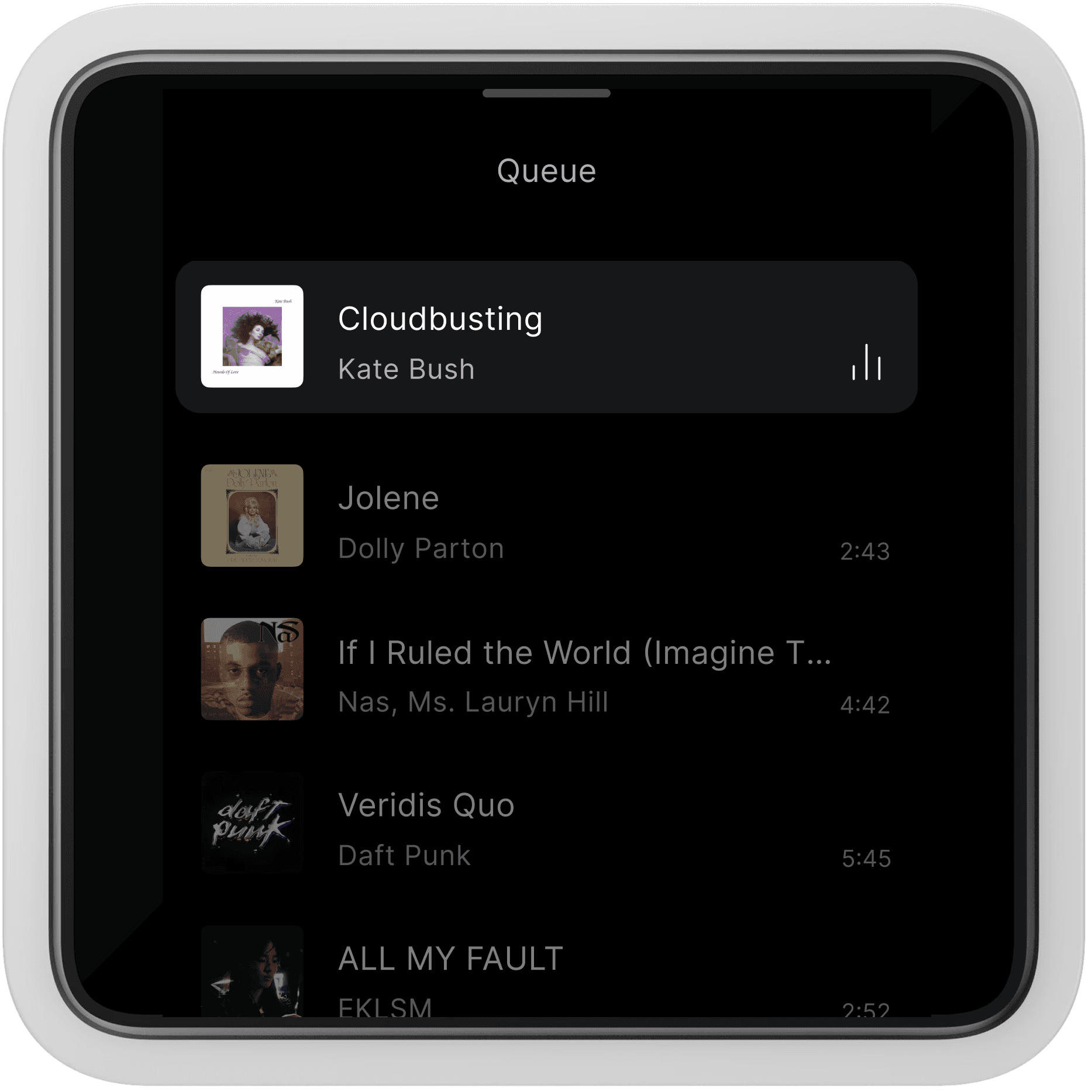
    Your upcoming queue, at a glance.

    View upcoming tracks and jump to your favourite songs directly from Tap, keeping the music flowing smoothly throughout the day.

  • Sonos integration

    Works seamlessly with your existing setup.

    Tap connects directly to your existing Sonos system, supporting both S1 and S2 platforms, bringing on-wall control to your home audio.

  • Volume adjustments

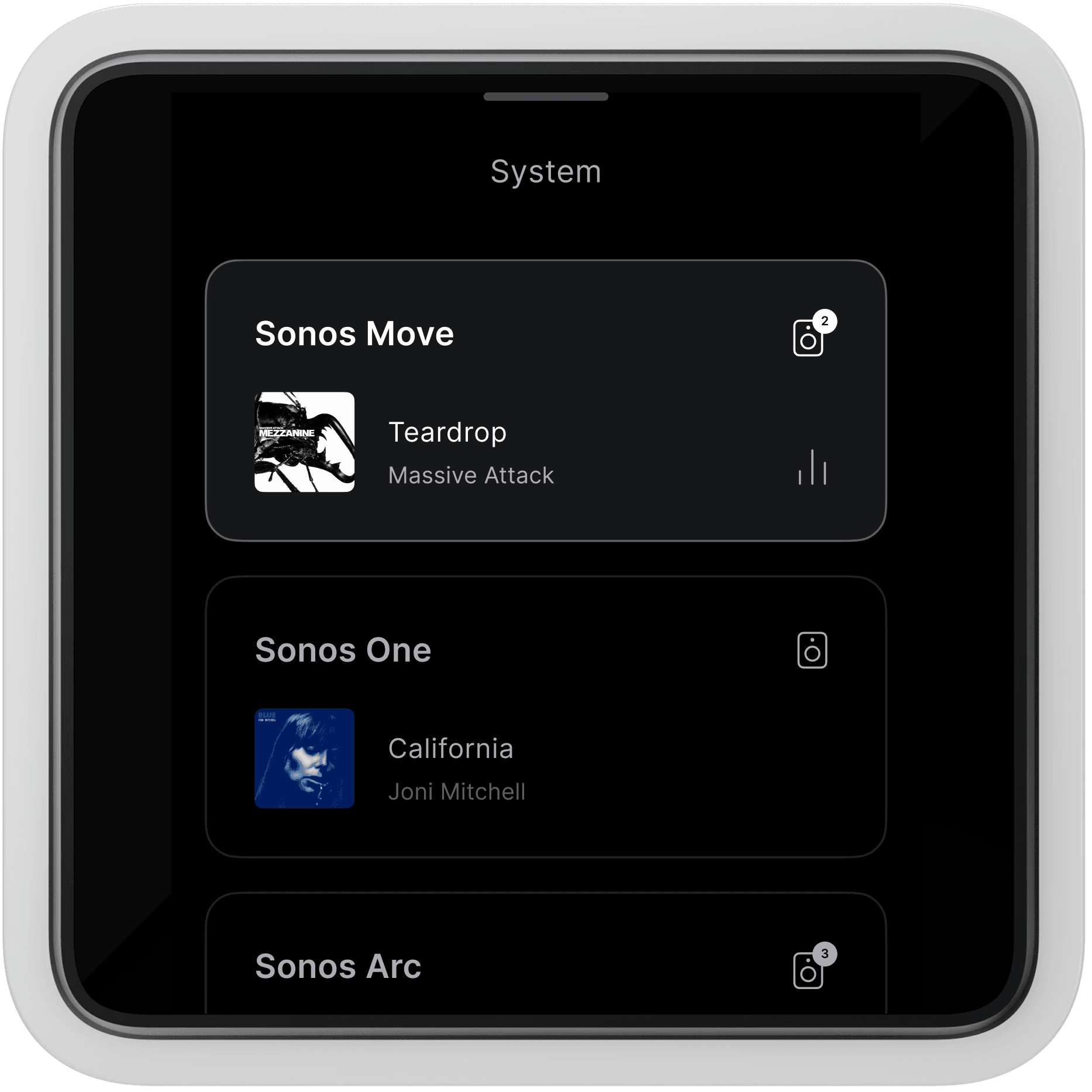
    Precision sound levels across every room. Balance outputs for individual rooms or
    fine-tune volume across the entire house with seamless control from any Tap.

  • Album art screensaver

    Now playing, beautifully displayed.

    Turn your Tap into a visual feature, with a dedicated screensaver that displays your current track and album artwork in vibrant detail.

  • Control Bar

    Your music, front and centre.

    A music icon appears on Tap's Control Bar whenever playback starts, giving you instant visibility and quick access to music control.

Queue selection

Your upcoming queue, at a glance.

View upcoming tracks and jump to your favourite songs directly from Tap, keeping the music flowing smoothly throughout the day.

Playback control

Music control, right on your wall.

Play, pause, skip tracks and see what is currently playing directly from the Tap on your wall, without reaching for your phone.

Sonos integration

Works seamlessly with your existing setup.

Tap connects directly to your existing Sonos system, supporting both S1 and S2 platforms, bringing on-wall control to your home audio.

Volume adjustments

Precision sound levels across every room. Balance outputs for individual rooms or
fine-tune volume across the entire house with seamless control from any Tap.

Album art screensaver

Now playing, beautifully displayed.

Turn your Tap into a visual feature, with a dedicated screensaver that displays your current track and album artwork in vibrant detail.

Control Bar

Your music, front and centre.

A music icon appears on Tap's Control Bar whenever playback starts, giving you instant visibility and quick access to music control.

Sound that brings the whole
home together.

Music is at its best when the whole home can enjoy it. Start a playlist while cooking, adjust sound levels as kids move between spaces or turn the volume down in the whole house at bedtime with a single tap. Tap is shared sound, seamlessly woven into family life.

Dinner party

Morning routine

Working from home

Winding down

Music for everyone.

Changing the song shouldn't mean unlocking a phone, finding the right app or logging into someone's account first. With Tap, it's so simple. Kids, guests or anyone in the house can control music without needing their own device or a password.

Tricia

House transformation

"Tap’s fantastic value, it was much less expensive than other smart lighting systems and it was really easy for my electrician to install.”

Alice

Modern living

"With a variable energy tariff, Tap tells us when we can save money by picking the best times to use our electricity."

Emma and Piers

Family home

“Tap looks great. It’s given us the control we never had before, and it’s really easy to set up and use.”

Music is just the beginning.

Music is one part of a much bigger picture. The same switch that controls your sound also shapes your lighting, heating and provides insights into your energy use, all from one beautiful device.

Frequently asked questions.

What is a smart home music system?

It's a way of managing playback, volume and room selection from one place, without the need to use mobile apps.

Do I need new speakers to use Tewke's music feature?

You'll need a Sonos system (S1 or S2) already set up in your home. Tap connects to your existing Sonos speakers, there's no need to replace them.

Can Tap be used to control my Sonos system?

Yes. Tap is currently designed to work with Sonos, supporting both S1 and S2 systems, so you can control playback, rooms and volume directly from your wall.

Can I play different music in different rooms at the same time?

Yes. Tewke lets you choose which room your music plays in, so you can run different rooms independently or bring them together.

Can I control volume in one room without affecting the rest of the house?

Yes. Volume can be adjusted for the whole home together, or for each room individually.

Do I need my phone to control the music?

No. Tap gives you full playback control, including play, pause, skip and track selection, without needing a phone.

  • Playback control

    Music control, right on your wall.

    Play, pause, skip tracks and see what is currently playing directly from the Tap on your wall, without reaching for your phone.

  • Queue selection

    Your upcoming queue, at a glance.

    View upcoming tracks and jump to your favourite songs directly from Tap, keeping the music flowing smoothly throughout the day.

  • Sonos integration

    Works seamlessly with your existing setup.

    Tap connects directly to your existing Sonos system, supporting both S1 and S2 platforms, bringing on-wall control to your home audio.

  • Volume adjustments

    Precision sound levels across every room. Balance outputs for individual rooms or
    fine-tune volume across the entire house with seamless control from any Tap.

  • Album art screensaver

    Now playing, beautifully displayed.

    Turn your Tap into a visual feature, with a dedicated screensaver that displays your current track and album artwork in vibrant detail.

  • Control Bar

    Your music, front and centre.

    A music icon appears on Tap's Control Bar whenever playback starts, giving you instant visibility and quick access to music control.

Queue selection

Your upcoming queue, at a glance.

View upcoming tracks and jump to your favourite songs directly from Tap, keeping the music flowing smoothly throughout the day.

Playback control

Music control, right on your wall.

Play, pause, skip tracks and see what is currently playing directly from the Tap on your wall, without reaching for your phone.

Sonos integration

Works seamlessly with your existing setup.

Tap connects directly to your existing Sonos system, supporting both S1 and S2 platforms, bringing on-wall control to your home audio.

Volume adjustments

Precision sound levels across every room. Balance outputs for individual rooms or
fine-tune volume across the entire house with seamless control from any Tap.

Album art screensaver

Now playing, beautifully displayed.

Turn your Tap into a visual feature, with a dedicated screensaver that displays your current track and album artwork in vibrant detail.

Control Bar

Your music, front and centre.

A music icon appears on Tap's Control Bar whenever playback starts, giving you instant visibility and quick access to music control.

Sound that brings the whole
home together.

Music is at its best when the whole home can enjoy it. Start a playlist while cooking, adjust sound levels as kids move between spaces or turn the volume down in the whole house at bedtime with a single tap. Tap is shared sound, seamlessly woven into family life.

Dinner party

Morning routine

Working from home

Winding down

Music for everyone.

Changing the song shouldn't mean unlocking a phone, finding the right app or logging into someone's account first. With Tap, it's so simple. Kids, guests or anyone in the house can control music without needing their own device or a password.

Tricia

House transformation

"Tap’s fantastic value, it was much less expensive than other smart lighting systems and it was really easy for my electrician to install.”

Alice

Modern living

"With a variable energy tariff, Tap tells us when we can save money by picking the best times to use our electricity."

Emma and Piers

Family home

"Tap’s fantastic value, it was much less expensive than other smart lighting systems and it was really easy for my electrician to install.”

Music is just the beginning.

Music is one part of a much bigger picture. The same switch that controls your sound also shapes your lighting, heating and provides insights into your energy use, all from one beautiful device.

Frequently asked questions.

What is a smart home music system?

It's a way of managing playback, volume and room selection from one place, without the need to use mobile apps.

Do I need new speakers to use Tewke's music feature?

You'll need a Sonos system (S1 or S2) already set up in your home. Tap connects to your existing Sonos speakers, there's no need to replace them.

Can Tap be used to control my Sonos system?

Yes. Tap is currently designed to work with Sonos, supporting both S1 and S2 systems, so you can control playback, rooms and volume directly from your wall.

Can I play different music in different rooms at the same time?

Yes. Tewke lets you choose which room your music plays in, so you can run different rooms independently or bring them together.

Can I control volume in one room without affecting the rest of the house?

Yes. Volume can be adjusted for the whole home together, or for each room individually.

Do I need my phone to control the music?

No. Tap gives you full playback control, including play, pause, skip and track selection, without needing a phone.

  • Playback control

    Music control, right on your wall.

    Play, pause, skip tracks and see what is currently playing directly from the Tap on your wall, without reaching for your phone.

  • Queue selection

    Your upcoming queue, at a glance.

    View upcoming tracks and jump to your favourite songs directly from Tap, keeping the music flowing smoothly throughout the day.

  • Sonos integration

    Works seamlessly with your existing setup.

    Tap connects directly to your existing Sonos system, supporting both S1 and S2 platforms, bringing on-wall control to your home audio.

  • Volume adjustments

    Precision sound levels across every room. Balance outputs for individual rooms or
    fine-tune volume across the entire house with seamless control from any Tap.

  • Album art screensaver

    Now playing, beautifully displayed.

    Turn your Tap into a visual feature, with a dedicated screensaver that displays your current track and album artwork in vibrant detail.

  • Control Bar

    Your music, front and centre.

    A music icon appears on Tap's Control Bar whenever playback starts, giving you instant visibility and quick access to music control.

Queue selection

Your upcoming queue, at a glance.

View upcoming tracks and jump to your favourite songs directly from Tap, keeping the music flowing smoothly throughout the day.

Playback control

Music control, right on your wall.

Play, pause, skip tracks and see what is currently playing directly from the Tap on your wall, without reaching for your phone.

Sonos integration

Works seamlessly with your existing setup.

Tap connects directly to your existing Sonos system, supporting both S1 and S2 platforms, bringing on-wall control to your home audio.

Volume adjustments

Precision sound levels across every room. Balance outputs for individual rooms or
fine-tune volume across the entire house with seamless control from any Tap.

Album art screensaver

Now playing, beautifully displayed.

Turn your Tap into a visual feature, with a dedicated screensaver that displays your current track and album artwork in vibrant detail.

Control Bar

Your music, front and centre.

A music icon appears on Tap's Control Bar whenever playback starts, giving you instant visibility and quick access to music control.

Sound that brings the whole home together.

Music is at its best when the whole home can enjoy it. Start a playlist while cooking, adjust sound levels as kids move between spaces or turn the volume down in the whole house at bedtime with a single tap. Tap is shared sound, seamlessly woven into family life.

Dinner party

Morning routine

Working from home

Winding down

Music for everyone.

Changing the song shouldn't mean unlocking a phone, finding the right app or logging into someone's account first. With Tap, it's so simple. Kids, guests or anyone in the house can control music without needing their own device or a password.

Tricia

House transformation

"Tap’s fantastic value, it was much less expensive than other smart lighting systems and it was really easy for my electrician to install.”

Alice

Modern living

"With a variable energy tariff, Tap tells us when we can save money by picking the best times to use our electricity."

Emma and Piers

Family home

“Tap looks great. It’s given us the control we never had before, and it’s really easy to set up and use.”

Music is just the beginning.

Music is one part of a much bigger picture. The same switch that controls your sound also shapes your lighting, heating and provides insights into your energy use, all from one beautiful device.

Frequently asked questions.

What is a smart home music system?

It's a way of managing playback, volume and room selection from one place, without the need to use mobile apps.

Do I need new speakers to use Tewke's music feature?

You'll need a Sonos system (S1 or S2) already set up in your home. Tap connects to your existing Sonos speakers, there's no need to replace them.

Can Tap be used to control my Sonos system?

Yes. Tap is currently designed to work with Sonos, supporting both S1 and S2 systems, so you can control playback, rooms and volume directly from your wall.

Can I play different music in different rooms at the same time?

Yes. Tewke lets you choose which room your music plays in, so you can run different rooms independently or bring them together.

Can I control volume in one room without affecting the rest of the house?

Yes. Volume can be adjusted for the whole home together, or for each room individually.

Do I need my phone to control the music?

No. Tap gives you full playback control, including play, pause, skip and track selection, without needing a phone.

  • Playback control

    Music control, right on your wall.

    Play, pause, skip tracks and see what is currently playing directly from the Tap on your wall, without reaching for your phone.

  • Queue selection

    Your upcoming queue, at a glance.

    View upcoming tracks and jump to your favourite songs directly from Tap, keeping the music flowing smoothly throughout the day.

  • Sonos integration

    Works seamlessly with your existing setup.

    Tap connects directly to your existing Sonos system, supporting both S1 and S2 platforms, bringing on-wall control to your home audio.

  • Volume adjustments

    Precision sound levels across every room. Balance outputs for individual rooms or
    fine-tune volume across the entire house with seamless control from any Tap.

  • Album art screensaver

    Now playing, beautifully displayed.

    Turn your Tap into a visual feature, with a dedicated screensaver that displays your current track and album artwork in vibrant detail.

  • Control Bar

    Your music, front and centre.

    A music icon appears on Tap's Control Bar whenever playback starts, giving you instant visibility and quick access to music control.

Queue selection

Your upcoming queue, at a glance.

View upcoming tracks and jump to your favourite songs directly from Tap, keeping the music flowing smoothly throughout the day.

Playback control

Music control, right on your wall.

Play, pause, skip tracks and see what is currently playing directly from the Tap on your wall, without reaching for your phone.

Sonos integration

Works seamlessly with your existing setup.

Tap connects directly to your existing Sonos system, supporting both S1 and S2 platforms, bringing on-wall control to your home audio.

Volume adjustments

Precision sound levels across every room. Balance outputs for individual rooms or
fine-tune volume across the entire house with seamless control from any Tap.

Album art screensaver

Now playing, beautifully displayed.

Turn your Tap into a visual feature, with a dedicated screensaver that displays your current track and album artwork in vibrant detail.

Control Bar

Your music, front and centre.

A music icon appears on Tap's Control Bar whenever playback starts, giving you instant visibility and quick access to music control.

Sound that brings the whole
home together.

Music is at its best when the whole home can enjoy it. Start a playlist while cooking, adjust sound levels as kids move between spaces or turn the volume down in the whole house at bedtime with a single tap. Tap is shared sound, seamlessly woven into family life.

Dinner party

Morning routine

Working from home

Winding down

Music for everyone.

Changing the song shouldn't mean unlocking a phone, finding the right app or logging into someone's account first. With Tap, it's so simple. Kids, guests or anyone in the house can control music without needing their own device or a password.

Tricia

House transformation

"Tap’s fantastic value, it was much less expensive than other smart lighting systems and it was really easy for my electrician to install.”

Alice

Modern living

"With a variable energy tariff, Tap tells us when we can save money by picking the best times to use our electricity."

Emma and Piers

Family home

“Tap looks great. It’s given us the control we never had before, and it’s really easy to set up and use.”

Music is just the beginning.

Music is one part of a much bigger picture. The same switch that controls your sound also shapes your lighting, heating and provides insights into your energy use, all from one beautiful device.

Frequently asked questions.

What is a smart home music system?

It's a way of managing playback, volume and room selection from one place, without the need to use mobile apps.

Do I need new speakers to use Tewke's music feature?

You'll need a Sonos system (S1 or S2) already set up in your home. Tap connects to your existing Sonos speakers, there's no need to replace them.

Can Tap be used to control my Sonos system?

Yes. Tap is currently designed to work with Sonos, supporting both S1 and S2 systems, so you can control playback, rooms and volume directly from your wall.

Can I play different music in different rooms at the same time?

Yes. Tewke lets you choose which room your music plays in, so you can run different rooms independently or bring them together.

Can I control volume in one room without affecting the rest of the house?

Yes. Volume can be adjusted for the whole home together, or for each room individually.

Do I need my phone to control the music?

No. Tap gives you full playback control, including play, pause, skip and track selection, without needing a phone.